

When it comes to creative video production, Firefly video adobe stands out as one of the most exciting developments in 2025. As demand for engaging visual content surges across social media, marketing, and film, Adobe’s generative‑AI offering delivers a streamlined, powerful, and flexible workflow — enabling creators to go from idea to polished video with minimal friction.
What Exactly is Firefly Video Adobe?
At its core, Firefly video adobe refers to the video‑generation and editing capabilities offered through Adobe Firefly’s suite of tools. Originally known for AI-driven image generation, Adobe expanded Firefly in 2025 to accommodate video, audio, and more — making it a full creative studio in the cloud
With Firefly Video, users can generate full 1080p video clips from simple text prompts or static images; apply cinematic camera movement; adjust style; and layer in audio, sound effects, and speech — all in one intuitive interface.
This makes Firefly Video Adobe not just a gimmick, but a practical tool for creators who need quick, high‑quality video content without complex traditional editing.
Key Features of Firefly Video Adobe (2025 Edition)
Text-to-Video & Image-to-Video Generation
One of the biggest draws of Firefly Video Adobe is its ability to generate video from a simple prompt or an image. Whether you sketch a concept, feed in a photo, or type a scene description, Firefly can turn it into a moving clip. The newly released Firefly Video Model — now publicly available — supports this fully.
This opens up possibilities not just for marketers, but storytellers, educators, and social‑media creators who may not have filming equipment but still want video output.
Built‑in Timeline Editor and Multimodal Workflow
With the 2025 update, Firefly now offers a web-based timeline editor (in beta) — you can trim, reorder, or stitch clips; add titles, audio, or generated scenes; and assemble complete videos directly in the browser.
That means less reliance on external editing software for basic to intermediate projects — handy for short-form content, explainer videos, ads, or social clips.
AI‑Generated Audio, Soundtracks & Speech
Firefly video adobe isn’t just about visuals anymore. The 2025 release added:
-
Generate Soundtrack (beta): Create original, fully licensed background music that matches your video’s mood and length.
-
Generate Speech (beta): Convert text into natural‑sounding voiceovers, supporting multiple languages, accents, and stylings — ideal for narration or educational content.
-
Sound Effects generation: Add custom sound effects — from ambient noise to cinematic impacts — triggered by prompts or even your own voice for timing control.
This integrated audio-video capability helps produce polished, ready-to-share content without third‑party stock libraries or voice actors.
Creative Control: Style Presets, Camera Angles, Reference-based Composition
Far from being a rigid generator, Firefly Video Adobe gives creators flexibility:
-
Choose visual styles like “claymation,” “anime,” “2D,” or photorealistic, depending on your project’s aesthetic.
-
Define camera angles, motion paths, and composition for generated videos — whether you want a sweeping aerial, cinematic close-up, or stylized animation.
-
Use a reference video or image to guide the composition and structure of the generated output, preserving flow and visual consistency when reworking or repurposing content.
Seamless Integration with Creative Cloud Ecosystem
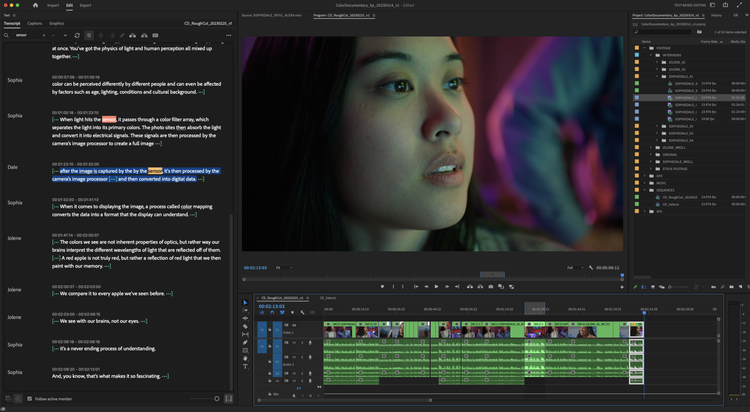
Projects created in Firefly can be exported to other Adobe apps — for example, sending a generated video to Adobe Premiere Pro for further editing, or combining imagery/video with design work in Adobe Photoshop or Adobe Express.
This integration makes Firefly Video Adobe a strong fit even for professionals working across multiple media formats — from branding videos to social media, ads, or short films.
Why Firefly Video Adobe Matters (Now)
In 2025, the landscape of digital content creation is more demanding than ever. Audiences expect high-quality, engaging video — often with quick turnaround, limited budgets, or minimal resources. Firefly Video Adobe addresses these pressures with its AI-first, cloud-first design.
-
Speed and convenience: You don’t need cameras, lighting, or physical shoots — just a prompt or image.
-
Cost-effective production: Avoid expenses like filming crews, stock libraries, voice actors, or licensing.
-
Accessibility: Creators with limited technical skills can still produce professional-looking videos.
-
Scalability: Brands, marketers, and content teams can generate multiple assets quickly — ideal for social media campaigns, ads, or global content with localization (voice/speech generation in multiple languages).
-
Creative freedom: AI-generated assets provide a starting point that you can refine, reuse, reimagine — without being locked into a rigid template.
Given all these advantages, Firefly Video Adobe is not just a novelty — it’s becoming an essential tool for modern content creators, agencies, and independent artists.
How to Get Started with Firefly Video Adobe
If you’re interested in trying it out, here’s a simple workflow:
-
Sign up for the Firefly app (on web; a mobile app is also rolling out).
-
In Firefly, choose Generate Video (beta) — enter a prompt or upload an image to start.
-
Adjust style, composition, camera settings, aspect ratio (16:9, 9:16, 1:1), motion path, and decide whether you want animation, 2D/3D effects, or stylized visuals.
-
Use the built‑in timeline editor to trim, add titles, insert multiple clips, or reorder scenes.
-
Add audio — either generated soundtrack, sound effects, or speech/voiceover via Generate Speech.
-
Export your video — you can finalize in Firefly or send to Premiere Pro / Express / Photoshop depending on your end‑use.
With just a few steps, you can go from idea to shareable video — no camera required.
Limitations & What to Know
Although Firefly Video Adobe is powerful, it does have some caveats (especially in the 2025 beta rollout):
-
Quality can vary. Because many workflows start from prompts or still images, the realism and coherence of generated footage may not always match high‑end professionally shot video. Some creators on communities have noted “hit or miss” results depending on the prompt’s clarity. reddit.com+1
-
Credits / plan-based limitations. Some features (video generation, high-resolution output, unlimited generations) may require a paid Firefly plan or Creative Cloud subscription.
-
Beta status for some features. Tools such as the timeline editor, custom models, and advanced audio may still be in beta — meaning occasional bugs or performance issues.
-
Ethical & creative responsibility. As with any generative AI tool, it’s crucial to respect copyright, avoid misuse, and maintain transparency about AI-generated content. According to Adobe, Firefly models are “commercially safe” — trained only on licensed content, and do not reuse user-generated media in training.
Use Cases: Who Benefits from Firefly Video Adobe
-
Social media content creators & influencers: Quickly generate short clips, animated intros, visually consistent reels without filming equipment.
-
Brands & marketers: Produce ads, promos, story content, or b-roll rapidly and cost-effectively — even for international campaigns with translated voiceovers.
-
Educators & online instructors: Create animated explainer videos, lectures with AI‑voiced narration, or visually engaging tutorials without needing filming gear.
-
Independent filmmakers & animators: Use Firefly as a quick prototyping tool — for storyboarding, previsualization, animatics, or mood‑boarding before committing to full production.
-
Small businesses & content teams: Lower barrier to entry for professional video production, especially when budgets or resources are constrained.
Conclusion
As of 2025, Firefly video adobe represents a major shift in how video content can be created — democratizing production, accelerating workflows, and expanding creative possibilities. From text-to-video and image-to-video generation to integrated editing, audio, and cross‑app export — Firefly puts powerful video tools into the hands of anyone with a browser.
While it’s not yet a full replacement for high-end cinematography or professional video crews, it’s an incredibly useful tool for marketers, creators, educators, small businesses, and indie filmmakers. As generative AI continues to evolve and Firefly expands its feature set, expect even more impressive creative control, realism, and flexibility.
For any creator looking to experiment or produce videos fast and affordably, Firefly Video Adobe is now a compelling — and realistic — option.
FAQs About Firefly Video Adobe
1. Is Firefly Video Adobe free to use?
Firefly offers basic image and vector generation for free, but video generation, high‑quality outputs, and advanced audio/video features typically require a paid Firefly plan or a plan through Adobe Creative Cloud.
2. Can I export Firefly-generated videos to other Adobe apps?
Yes — Firefly integrates seamlessly with other Adobe tools like Premiere Pro, Photoshop, and Adobe Express, allowing you to refine, edit, or composite generated videos further
3. What types of videos can I create with Firefly Video Adobe?
You can create a wide range of videos: animated clips from text or images, social media‑ready reels, explainer videos with AI‑voice narration, stylized animations (anime, claymation, 2D), marketing promos, and more.
4. Is the generated video content safe to use commercially?
Yes — according to Adobe, Firefly Video Model is commercially safe and IP‑friendly. Its training data is licensed, and content created with it can be used in production and commercial projects.
5. Does Firefly Video Adobe require technical skills or video editing experience to use?
Not necessarily. One of Firefly’s strengths is its accessibility — you can generate and assemble video clips using text prompts or images, use built‑in editing tools, and add audio or voiceovers — without deep video editing expertise. That said, more complex projects may benefit from basic editing knowledge.
